
To run an LLM on your own machine from Python, install Ollama, download a model with ollama pull, and call it with ollama.chat() from the ollama package. There is no API key and no per-request charge, and your prompts stay on your computer when you use a local model.
The code here was run with Ollama 0.40.18 and ollama 0.6.3 (the Python package) on a MacBook with an M1 Pro and 16 GB of memory.
Quick Example
Download a model once (about 3.3 GB) and install the Python package:
ollama pull qwen3.5:4b-q4_K_M
pip install ollama
Then ask it something:
import ollama

MODEL = "qwen3.5:4b-q4_K_M"

response = ollama.chat(
    model=MODEL,
    messages=[{"role": "user", "content": "In one sentence, what is a violin plot?"}],
    think=False,
    options={"temperature": 0, "seed": 1},
)
print(response.message.content)
The reply on my machine:
A violin plot is a combination of a box plot and a kernel density estimate that displays the distribution of data points across different categories by showing the shape of the probability density function.
think=False matters. Qwen 3.5 reasons before answering by default, which is far slower. Wording can differ between machines and Ollama versions, even with a fixed seed.
How to Install Ollama
Ollama is a program that downloads models and serves them at http://localhost:11434. The Python package only talks to that server, so you need both.
- macOS and Windows: use the installer from ollama.com/download. The app starts the server for you.
- Linux:
curl -fsSL https://ollama.com/install.sh | sh - Homebrew:
brew install ollama, then keepollama serverunning in a terminal (or runbrew services start ollamato start it at login).
ollama list shows the models you've downloaded, and ollama run qwen3.5:4b-q4_K_M opens a chat in the terminal.
A model name is family:tag, and the tag picks the size and the compression. 4b means about 4 billion parameters and q4_K_M means the weights are stored in roughly 4 bits each. On Apple silicon the short tag qwen3.5:4b gave me an MLX build, and with the Homebrew install every structured output request to it failed with structured output is unavailable. The q4_K_M tag runs on Ollama's other engine and worked, so this post uses it.
Stream the Reply as It's Generated
Pass stream=True and loop over the chunks, so text appears as soon as the model writes it:
stream = ollama.chat(
    model=MODEL,
    messages=[{"role": "user", "content": "Name three ways to show a distribution."}],
    think=False,
    stream=True,
)
for chunk in stream:
    print(chunk.message.content, end="", flush=True)
System Prompts and Generation Settings
A system message sets the behavior for the whole conversation. Settings go in options:
response = ollama.chat(
    model=MODEL,
    messages=[
        {"role": "system", "content": "You answer with a single Matplotlib method name and nothing else."},
        {"role": "user", "content": "How do I draw horizontal bars?"},
    ],
    think=False,
    options={"temperature": 0, "num_predict": 50},
)
print(response.message.content)
print(response.prompt_eval_count, "tokens in,", response.eval_count, "tokens out")
barh
37 tokens in, 3 tokens out
| Option | What it does |
|---|---|
temperature |
Randomness. 0 picks the most likely token each time. |
seed |
Makes sampling repeatable on the same setup. |
num_predict |
Maximum number of tokens to generate. |
num_ctx |
Context window size: how much conversation the model can see. |
Thinking Mode
With think=True (the default for this model), the reasoning arrives in response.message.thinking and the answer in response.message.content. Reasoning tokens count toward num_predict, so a small limit can leave you with no answer at all:
response = ollama.chat(
    model=MODEL,
    messages=[{"role": "user", "content": "Explain recursion."}],
    options={"temperature": 0, "num_predict": 50},
)
print(repr(response.message.content))
print(response.done_reason)
print(response.message.thinking[:60])
''
length
Here's a thinking process that leads to the explanation of r
If content is empty and done_reason is "length", raise num_predict or set think=False.
How Long a Conversation Can It Handle?
The model has no memory between calls: send the earlier messages each time and append each reply.
messages = [{"role": "user", "content": "My chart has 40 categories. Which chart type fits?"}]
reply = ollama.chat(model=MODEL, messages=messages, think=False, options={"temperature": 0, "num_predict": 80})
messages.append({"role": "assistant", "content": reply.message.content})
messages.append({"role": "user", "content": "How do I sort it?"})
reply = ollama.chat(model=MODEL, messages=messages, think=False, options={"temperature": 0, "num_predict": 80})
print(reply.message.content[:200])
All of those messages have to fit in the context window. Ollama picks the default from your GPU memory: 4k tokens under 24 GiB, 32k from 24 to 48 GiB, and 256k at 48 GiB or more (context length docs). What happens past the limit depends on where the text is:
filler = "Filler sentence about nothing in particular. " * 900
long_message = "The secret code is PINEAPPLE-42. " + filler
question = {"role": "user", "content": "What is the secret code?"}

# One message that is too long: an error
try:
    ollama.chat(model=MODEL, messages=[{"role": "user", "content": long_message + question["content"]}],
                think=False, options={"num_ctx": 4096})
except ollama.ResponseError as e:
    print(e.error[:62])

# Too long only because of an older message: that message is dropped, with no error
history = [{"role": "user", "content": long_message},
           {"role": "assistant", "content": "OK"},
           question]
for num_ctx in (4096, 16384):
    r = ollama.chat(model=MODEL, messages=history, think=False,
                    options={"temperature": 0, "num_ctx": num_ctx, "num_predict": 30})
    print(num_ctx, r.prompt_eval_count, "tokens:", r.message.content[:60].replace("\n", " "))
the prompt is longer than the context length currently availab
4096 24 tokens: I don't have access to any specific "secret code" unless you
16384 7240 tokens: The secret code is **PINEAPPLE-42**.
The second case is the one to watch. With 4,096 tokens the request succeeds, but prompt_eval_count is tiny because the message holding the code was removed. Raise num_ctx (or start the server with OLLAMA_CONTEXT_LENGTH=16384 ollama serve) if your conversations or documents are long. A bigger window uses more memory. For long documents, retrieving only the relevant passages usually works better.
Get JSON Back with Pydantic
Pass a JSON schema as format and the reply is constrained to match it. A Pydantic model writes the schema and validates the result:
from typing import Literal

from pydantic import BaseModel

Column = Literal["month", "region", "revenue", "ad_spend"]


class ChartChoice(BaseModel):
    chart_type: Literal["line", "bar", "scatter", "histogram"]
    x: Column
    y: Column | None


def choose_chart(question):
    prompt = (f"Columns: month, region, revenue, ad_spend. "
              f"Pick one chart for this question: {question} Reply as JSON.")
    response = ollama.chat(model=MODEL, messages=[{"role": "user", "content": prompt}],
                           format=ChartChoice.model_json_schema(), think=False,
                           options={"temperature": 0})
    return ChartChoice.model_validate_json(response.message.content)


for question in ["How has revenue changed over time?",
                 "Does ad spend relate to revenue?",
                 "Which region sells the most?",
                 "How spread out are the revenue values?"]:
    print(question, "->", choose_chart(question))
How has revenue changed over time? -> chart_type='line' x='month' y='revenue'
Does ad spend relate to revenue? -> chart_type='scatter' x='ad_spend' y='revenue'
Which region sells the most? -> chart_type='bar' x='region' y='revenue'
How spread out are the revenue values? -> chart_type='histogram' x='revenue' y='revenue'
All four chart types are sensible, but look at the last line: a histogram has only an x column, and the model filled y with revenue anyway, although null was allowed. A schema guarantees the shape of the answer, with allowed values and column names, but not that the values make sense together, so check them in code. Letting an LLM generate charts from a DataFrame shows how to validate a spec like this and draw it.
How Fast Are Local Models?
I timed three Qwen 3.5 sizes on three short questions (a multiplication, the "bat and ball" puzzle and a two-step word problem), three runs each, with thinking off and on:
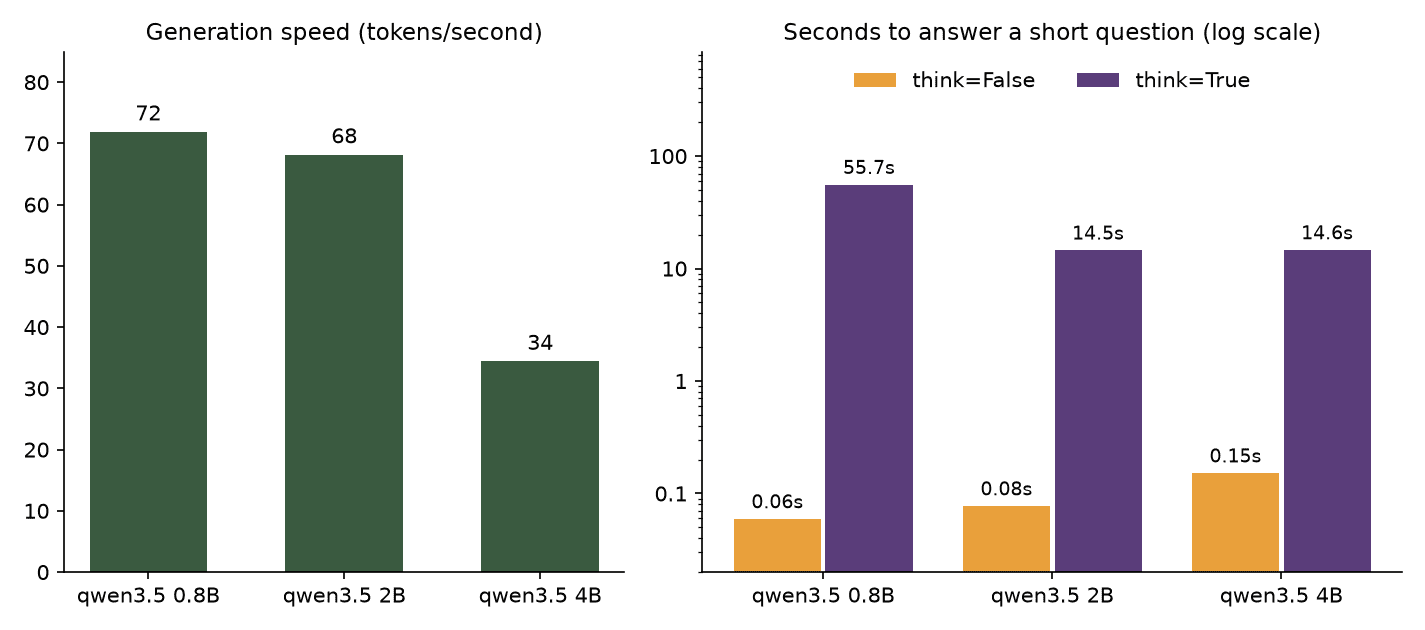
| Model tag | Memory loaded | Tokens/s | Correct, thinking off | Correct, thinking on | Median time, thinking on |
|---|---|---|---|---|---|
qwen3.5:0.8b-q8_0 |
1.1 GB | 72 | 0 of 9 | 3 of 9 | 55.7 s |
qwen3.5:2b-q4_K_M |
1.7 GB | 68 | 3 of 9 | 8 of 9 | 14.5 s |
qwen3.5:4b-q4_K_M |
3.3 GB | 34 | 6 of 9 | 9 of 9 | 14.6 s |
With thinking off, every model answered in a fraction of a second because the reply is only a few tokens. Thinking was much slower and more accurate. The 0.8B model often kept reasoning until it hit my 4,000-token limit and returned nothing, which is why it was the slowest despite generating tokens fastest. Three questions are far too few to rank models, and the memory figures are for an 8,192-token context. Time the sizes on your own task.
Every response reports eval_count (tokens generated) and eval_duration (in nanoseconds), so you can compute speed yourself:
response = ollama.chat(model=MODEL, messages=[{"role": "user", "content": "List five chart types."}],
                       think=False)
print(f"{response.eval_count / (response.eval_duration / 1e9):.0f} tokens per second")
Call Ollama Without the Python Package
The server has a REST API, plus an endpoint that accepts OpenAI-style requests, so tools written for that format can point at http://localhost:11434/v1:
import httpx

r = httpx.post(
    "http://localhost:11434/v1/chat/completions",
    json={"model": MODEL, "reasoning_effort": "none",
          "messages": [{"role": "user", "content": "Say hi"}]},
    timeout=120,
)
print(r.json()["choices"][0]["message"]["content"])
"reasoning_effort": "none" turns thinking off on that endpoint.
Common Errors and Memory
| Message or symptom | Fix |
|---|---|
ConnectionError: Failed to connect to Ollama |
Start the app or run ollama serve. |
ResponseError: model '...' not found (status 404) |
Run ollama pull with that exact tag, or ollama.pull("..."). |
the prompt is longer than the context length |
Shorten the prompt or raise num_ctx. |
Empty content, done_reason is "length" |
Raise num_predict or set think=False. |
| First request is slow | The model is loading into memory. Later calls reuse it. |
A loaded model stays in memory for 5 minutes after the last request. Check what's loaded with ollama ps (or ollama.ps()). Pass keep_alive="30m" to keep it longer, or keep_alive=0 to unload it right away.
Local Model or Hosted API?
| Local with Ollama | Hosted API | |
|---|---|---|
| Cost | Free after the download, uses your hardware | Billed per token |
| Privacy | Prompts stay on your machine | Prompts go to the provider |
| Quality | Limited by the model your memory can hold | Access to much larger models |
| Setup | Several GB per model | An account and an API key |
| Good for | Experiments, private data, offline work, bulk simple tasks | Hard reasoning, long documents, production traffic you don't want to host |
Ollama also offers cloud models (tags containing cloud). Those run on Ollama's servers, so the privacy row doesn't apply to them.