
A Streamlit chat app needs four calls: st.chat_input to get a message, st.chat_message to draw each bubble, st.write_stream to show a reply as it arrives, and st.session_state to remember the conversation. This post builds the interface with a stand-in bot first, then connects it to a large language model (Claude, through the anthropic package). It targets Streamlit 1.67 and anthropic 2.14.
Quick Example
This version needs no API key. Save it as app.py and run streamlit run app.py.
import time

import streamlit as st

TIPS = {
    "water": "Water when the top few centimeters of soil are dry, then let the pot drain.",
    "light": "Most houseplants like bright, indirect light. A spot near an east window works well.",
    "yellow": "Yellow leaves often mean too much water. Check that the roots aren't sitting wet.",
}


def reply_stream(prompt):
    matches = [tip for word, tip in TIPS.items() if word in prompt.lower()]
    answer = " ".join(matches) or "Ask me about water, light, or yellow leaves."
    for word in answer.split():
        yield word + " "
        time.sleep(0.04)


st.title("Plant Care Bot")

if "messages" not in st.session_state:
    st.session_state.messages = []

for message in st.session_state.messages:
    with st.chat_message(message["role"]):
        st.markdown(message["content"])

if prompt := st.chat_input("Ask about your plants"):
    st.session_state.messages.append({"role": "user", "content": prompt})
    with st.chat_message("user"):
        st.markdown(prompt)

    with st.chat_message("assistant"):
        reply = st.write_stream(reply_stream(prompt))
    st.session_state.messages.append({"role": "assistant", "content": reply})
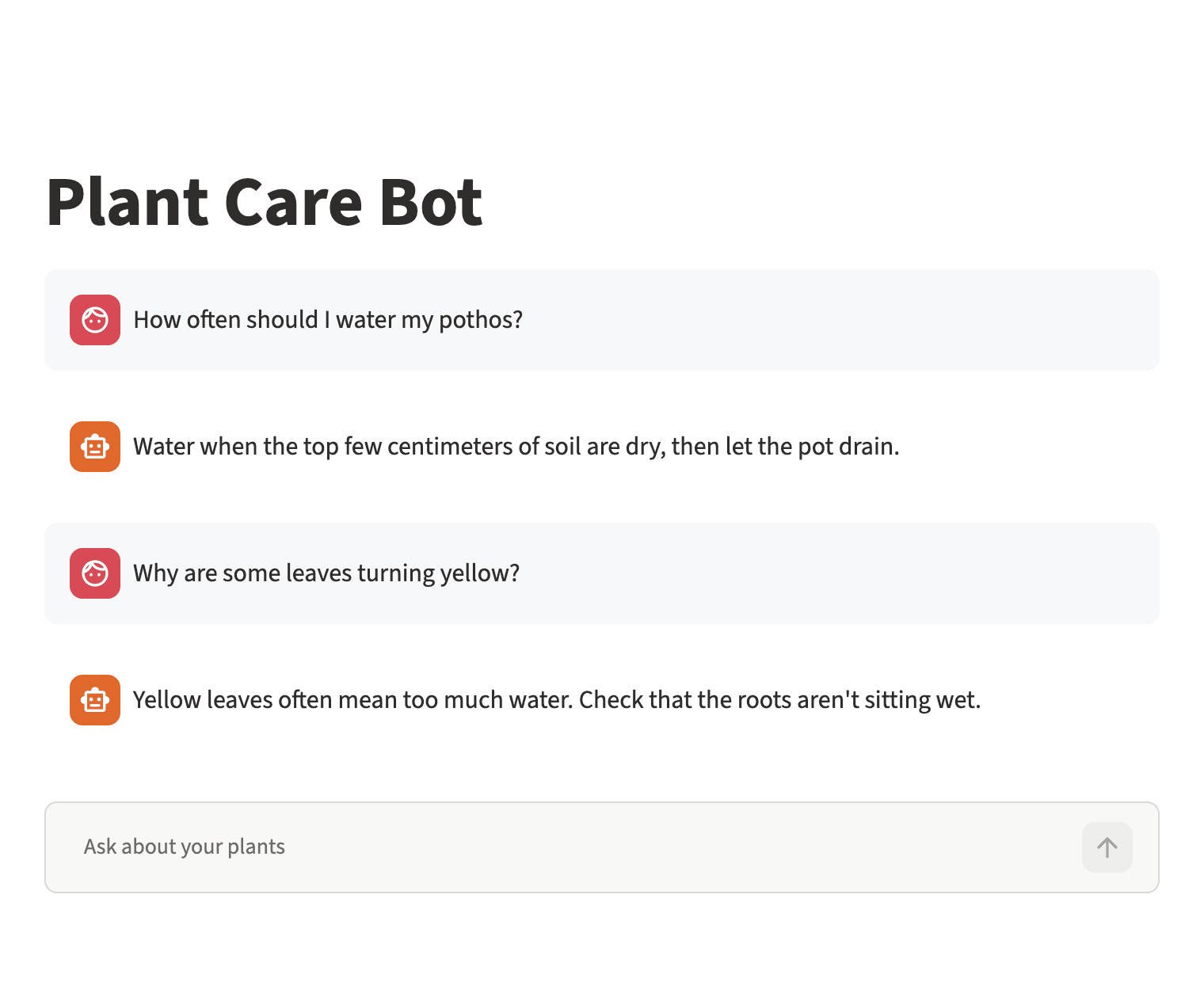
How Does a Streamlit Chat App Keep History?
Streamlit reruns the script for every message, so the page starts empty each time. The app handles that in three steps:
- Keep a list of
{"role": ..., "content": ...}dictionaries inst.session_state.messages. - Redraw every stored message at the top of each run.
- When
st.chat_inputreturns text, show it, generate a reply and append both to the list.
st.chat_input returns None on every run except the one right after someone presses Enter. Written at the top level of the script, it stays pinned to the bottom of the page. Passing "user" or "assistant" to st.chat_message picks the matching avatar, and avatar= takes an emoji or image instead.
The history belongs to one browser session and is gone after a page refresh. See the session state post for how that works.
Connect the Chatbot to Claude
Install the SDK and set an API key from the Claude Console:
pip install streamlit anthropic
export ANTHROPIC_API_KEY="your-key-here"
Then replace app.py with this version. The history list already has the shape the Messages API expects, so you can send it as is:
import anthropic
import streamlit as st

MODEL = "claude-opus-5-5"
SYSTEM = "You are a friendly plant care assistant. Keep answers short and practical."


@st.cache_resource
def get_client():
    return anthropic.Anthropic()


def stream_reply(messages, result):
    with get_client().beta.messages.stream(
        model=MODEL,
        max_tokens=16000,
        system=SYSTEM,
        messages=messages,
        output_config={"effort": "low"},
        betas=["server-side-fallback-2026-07-01"],
        fallbacks="default",
    ) as stream:
        yield from stream.text_stream
        result["stop_reason"] = stream.get_final_message().stop_reason


st.title("Plant Care Assistant")

if "messages" not in st.session_state:
    st.session_state.messages = []

st.sidebar.button("Clear chat", on_click=st.session_state.messages.clear)

for message in st.session_state.messages:
    with st.chat_message(message["role"]):
        st.markdown(message["content"])

if prompt := st.chat_input("Ask about your plants", submit_mode="disable"):
    st.session_state.messages.append({"role": "user", "content": prompt})
    with st.chat_message("user"):
        st.markdown(prompt)

    reply = None
    with st.chat_message("assistant"):
        result = {}
        try:
            text = st.write_stream(stream_reply(st.session_state.messages, result))
            if result["stop_reason"] == "refusal":
                st.warning("The model declined to answer that. Try rephrasing.")
            else:
                reply = text
        except anthropic.AuthenticationError:
            st.error("The API key was rejected. Check ANTHROPIC_API_KEY.")
        except anthropic.RateLimitError:
            st.error("Rate limit reached. Wait a moment and try again.")
        except anthropic.APIStatusError as error:
            st.error(f"The API returned an error ({error.status_code}).")
        except anthropic.APIConnectionError:
            st.error("Couldn't reach the API. Check your connection.")

    if reply:
        st.session_state.messages.append({"role": "assistant", "content": reply})
    else:
        st.session_state.messages.pop()
What the model call does:
stream.text_streamyields the reply in pieces, andst.write_streamdraws them as they arrive and returns the full string.- The API doesn't remember earlier requests, so
messagescarries the whole conversation each time. output_config={"effort": "low"}favors quick answers. Raise it for harder questions.fallbacks="default", with itsbetasflag, lets the API retry a declined request on another model. It works on Anthropic's own API, not on every cloud platform. The app still checksstop_reasonfor the case where no model answers.submit_mode="disable"locks the input while a reply is streaming.
If a request fails, the app removes the unanswered question so the next request starts from a clean history.
If the app stops with a TypeError that says Could not resolve authentication method, the SDK found no key. Set the variable in the same terminal that runs streamlit run, or use secrets as below.
Store the API Key With Streamlit Secrets
Put the key in .streamlit/secrets.toml and add that file to .gitignore:
ANTHROPIC_API_KEY = "your-key-here"
Then pass it to the client:
@st.cache_resource
def get_client():
    return anthropic.Anthropic(api_key=st.secrets["ANTHROPIC_API_KEY"])
The deployment post shows where to enter secrets on a hosted app.
Limit What a Public Chatbot Can Spend
Every message on a public app is billed to your key, and longer histories cost more per request. A per-session cap is a simple first guard. Add it above the if prompt line:
import streamlit as st

MAX_QUESTIONS = 10

history = st.session_state.get("messages", [])
asked = sum(message["role"] == "user" for message in history)
if asked >= MAX_QUESTIONS:
    st.info("You've reached the limit for this session.")
    st.stop()
A refresh starts a new session and resets the count, so also set a spend limit in your provider account and require a login before sharing the app widely.
Use a Different LLM Provider
The interface code doesn't depend on the model. Replace stream_reply with any generator that yields strings, and catch that library's errors. The Quick Example's reply_stream is the smallest case. st.write_stream also accepts OpenAI and LangChain stream objects directly.
Practical Tips
- Render replies with
st.markdown, which formats lists and code blocks. Leaveunsafe_allow_htmloff for model output. - Keep the system prompt in the code, not in the chat history, so users can't clear it.
- Create the client once with
@st.cache_resource, as described in the caching post.