
Put @st.cache_data above functions that load or compute data, and @st.cache_resource above functions that create something shared, such as a database connection or a machine learning model. Streamlit reruns your whole script on every widget change, and these decorators let it skip work it has already done. This post targets Streamlit 1.67.
Quick Example
Save this as app.py and run streamlit run app.py. The data load sleeps for two seconds to stand in for a slow query.
import time

import numpy as np
import pandas as pd
import streamlit as st

@st.cache_data
def load_readings(city: str) -> pd.DataFrame:
    time.sleep(2)  # pretend this is a slow database query
    rng = np.random.default_rng(len(city))
    days = pd.date_range("2026-01-01", periods=180, freq="D")
    season = 12 - 9 * np.cos(2 * np.pi * np.arange(180) / 365)
    return pd.DataFrame({"day": days, "temp": season + rng.normal(0, 2, 180)})

st.title("City Temperatures")
city = st.selectbox("City", ["Lisbon", "Oslo", "Montreal"])
window = st.slider("Smoothing window (days)", 1, 30, 7)

start = time.perf_counter()
readings = load_readings(city)
elapsed = time.perf_counter() - start

readings["smoothed"] = readings["temp"].rolling(window, min_periods=1).mean()
st.line_chart(readings, x="day", y=["temp", "smoothed"],
              color=["#a5d8ff", "#c2255c"], x_label="", y_label="°C")
st.caption(f"Data ready in {elapsed:.2f} seconds")
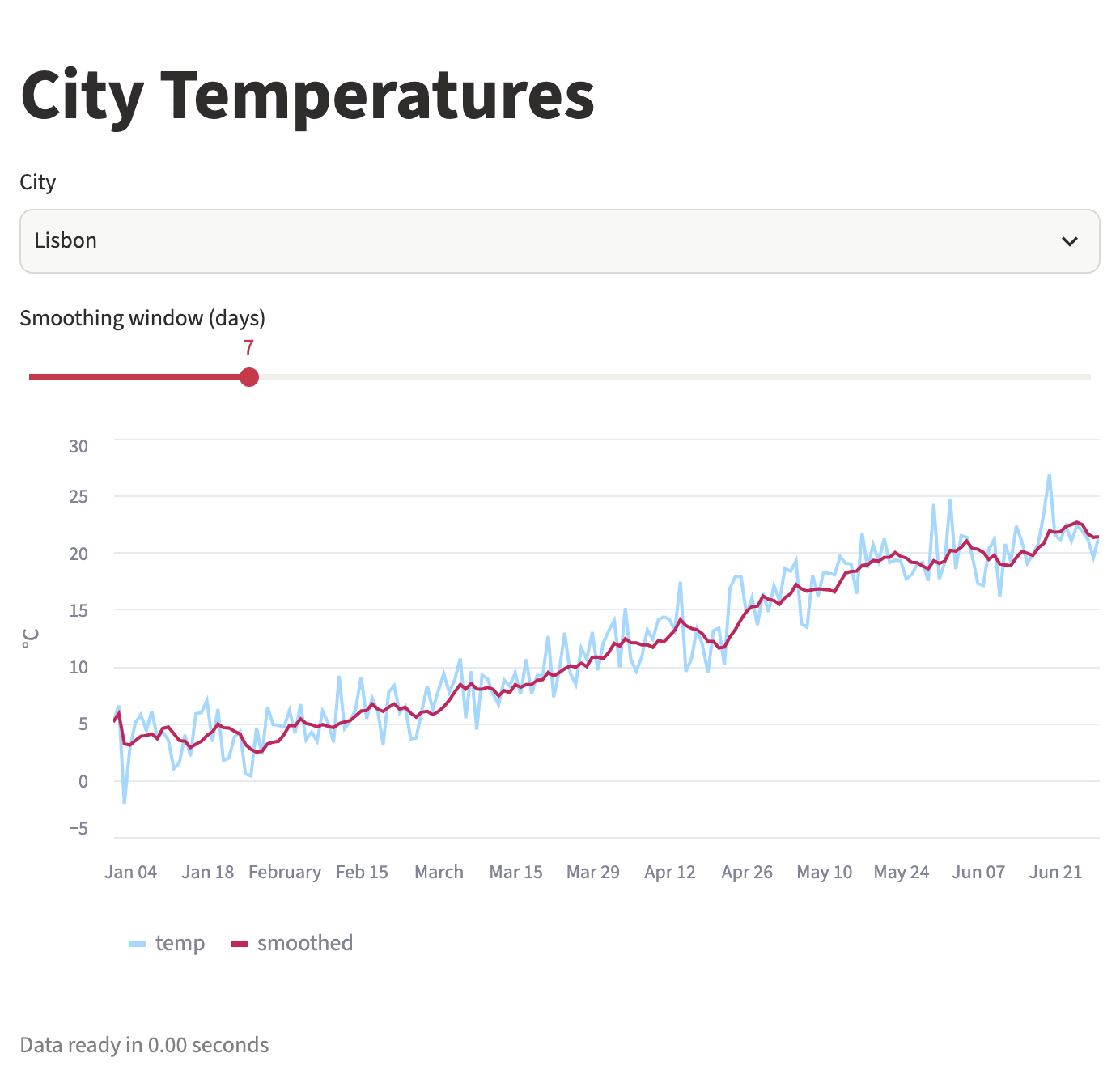
The first time you pick a city, the app waits two seconds. Move the smoothing slider and the chart redraws right away, because load_readings("Lisbon") comes from the cache. Picking Oslo is a new argument, so it waits once more, and switching back to Lisbon is instant. In the screenshot the data was already cached, so the caption reads 0.00 seconds.
How Does Streamlit Decide What to Reuse?
The cache key comes from the function's arguments and its source code. A call with the same values returns the stored result. Changing an argument or editing the function body runs it again.
The cache is global by default: every user of the deployed app shares it. If one visitor has already loaded Lisbon, the next one gets it immediately. That's the behavior you want for public data. For results that belong to one user, pass scope="session", or at least make sure the user's ID is an argument:
@st.cache_data(scope="session")
def load_my_orders(user_id: int) -> list[str]:
    return [f"order {user_id}-{n}" for n in range(3)]
When Should You Use st.cache_data vs st.cache_resource?
st.cache_data |
st.cache_resource |
|
|---|---|---|
| Use for | DataFrames, query results, API responses, computed arrays | Database connections, ML models, API clients |
| What you get back | A fresh copy on every call | The same object on every call |
| Return value must be picklable | Yes | No |
| Safe to modify the result | Yes | No, changes affect everyone |
persist="disk" |
Yes | No |
The difference that causes bugs is the copy. In the Quick Example, adding a smoothed column to readings is safe because st.cache_data hands back a copy. The cached original never changes.
Cache a Connection or a Model
A connection can't be pickled, and you wouldn't want a new one on each rerun anyway:
import sqlite3

@st.cache_resource
def get_connection() -> sqlite3.Connection:
    conn = sqlite3.connect(":memory:", check_same_thread=False)
    conn.execute("CREATE TABLE sales (region TEXT, amount REAL)")
    conn.executemany("INSERT INTO sales VALUES (?, ?)",
                     [("north", 120.0), ("south", 95.5), ("north", 60.0)])
    return conn
check_same_thread=False is needed with SQLite because Streamlit can run sessions on different threads. A shared object has to be safe to use from several threads at once, so serialize writes or use a client library that is thread-safe.
Pass an Unhashable Argument
Querying through that connection is data, so it gets st.cache_data. Streamlit can't hash the connection to build a cache key. Prefix the parameter with an underscore to leave it out:
@st.cache_data
def total_by_region(_conn: sqlite3.Connection, region: str) -> float:
    query = "SELECT SUM(amount) FROM sales WHERE region = ?"
    return _conn.execute(query, (region,)).fetchone()[0]

st.metric("North region sales", f"${total_by_region(get_connection(), 'north'):,.2f}")
Only region is part of the key here. If you underscore an argument that does change the result, you'll get stale answers for it.
Why Does a Cached List Keep Growing?
Because st.cache_resource returns the object itself. Anything you append stays there for the next rerun and the next user:
@st.cache_resource
def shared_list() -> list:
    return ["apple"]

@st.cache_data
def copied_list() -> list:
    return ["apple"]

shared_list().append("banana")
copied_list().append("banana")

st.write("cache_resource:", shared_list())
st.write("cache_data:", copied_list())
On the first run, shared_list() returns two items and copied_list() still returns one. Each rerun adds another banana to the shared list. Use that on purpose for things like a shared counter (with a lock), and use st.cache_data when you just want the value.
Expire the Cache With ttl and max_entries
By default, entries never expire. For data that changes, set a time to live, and cap the number of stored results so memory can't grow without limit:
@st.cache_data(ttl="15m", max_entries=100, show_spinner="Fetching prices...")
def fetch_prices(symbol: str) -> dict:
    return {"symbol": symbol, "price": 100.0}
ttlaccepts seconds, atimedelta, or a string such as"15m"or"1d". The next call after it expires runs the function again.max_entriesdrops the oldest entry once the cache is full.show_spinnerreplaces the default spinner text. PassFalseto hide it.refresh_mode="background"(used withttl) returns the expired value while a new one is computed, so nobody waits on a refresh.
ttl is ignored when you also set persist="disk".
How Do I Clear the Streamlit Cache?
Call .clear() on the function, or clear everything for that cache type. A refresh button is the usual place for it:
if st.button("Refresh prices"):
    fetch_prices.clear()          # every cached call of this function
    # fetch_prices.clear("ACME")  # only this argument
    # st.cache_data.clear()       # all st.cache_data functions
    st.rerun()
While developing, the app menu has a Clear cache option (or press C).
Practical Tips
- Cache the slow part only. Load the full dataset in a cached function, then filter outside it. Passing every filter into the function creates one cache entry per combination.
- Don't put widgets inside cached functions. The function body doesn't run on a cache hit. Read the widget outside and pass its value in.
- Rounded inputs hit more often. A float slider with tiny steps produces a new key for almost every position.
- Caching is not per-user memory. To keep a value for one visitor across reruns, such as a shopping cart, use
st.session_state.