
st.session_state is a dictionary that survives Streamlit reruns. Streamlit executes your whole script again after every interaction, so a normal variable starts over each time. Anything you want to remember, such as a counter, a list of entries, or the current step of a form, goes in st.session_state. This post targets Streamlit 1.67.
Quick Example
Save this as app.py and run streamlit run app.py. It tracks sets of push-ups.
import pandas as pd
import streamlit as st

if "sets" not in st.session_state:
    st.session_state.sets = []

def add_set(reps: int) -> None:
    st.session_state.sets.append(reps)

def undo() -> None:
    st.session_state.sets.pop()

st.title("Push-up Tracker")

with st.container(horizontal=True):
    for reps in (5, 10, 15):
        st.button(f"+{reps}", on_click=add_set, args=(reps,))
    st.button("Undo", on_click=undo, disabled=not st.session_state.sets)

sets = st.session_state.sets
st.metric("Total reps", sum(sets))

if sets:
    log = pd.DataFrame({"set": range(1, len(sets) + 1), "reps": sets})
    st.bar_chart(log, x="set", y="reps", color="#0c8599",
                 x_label="Set", y_label="Reps")
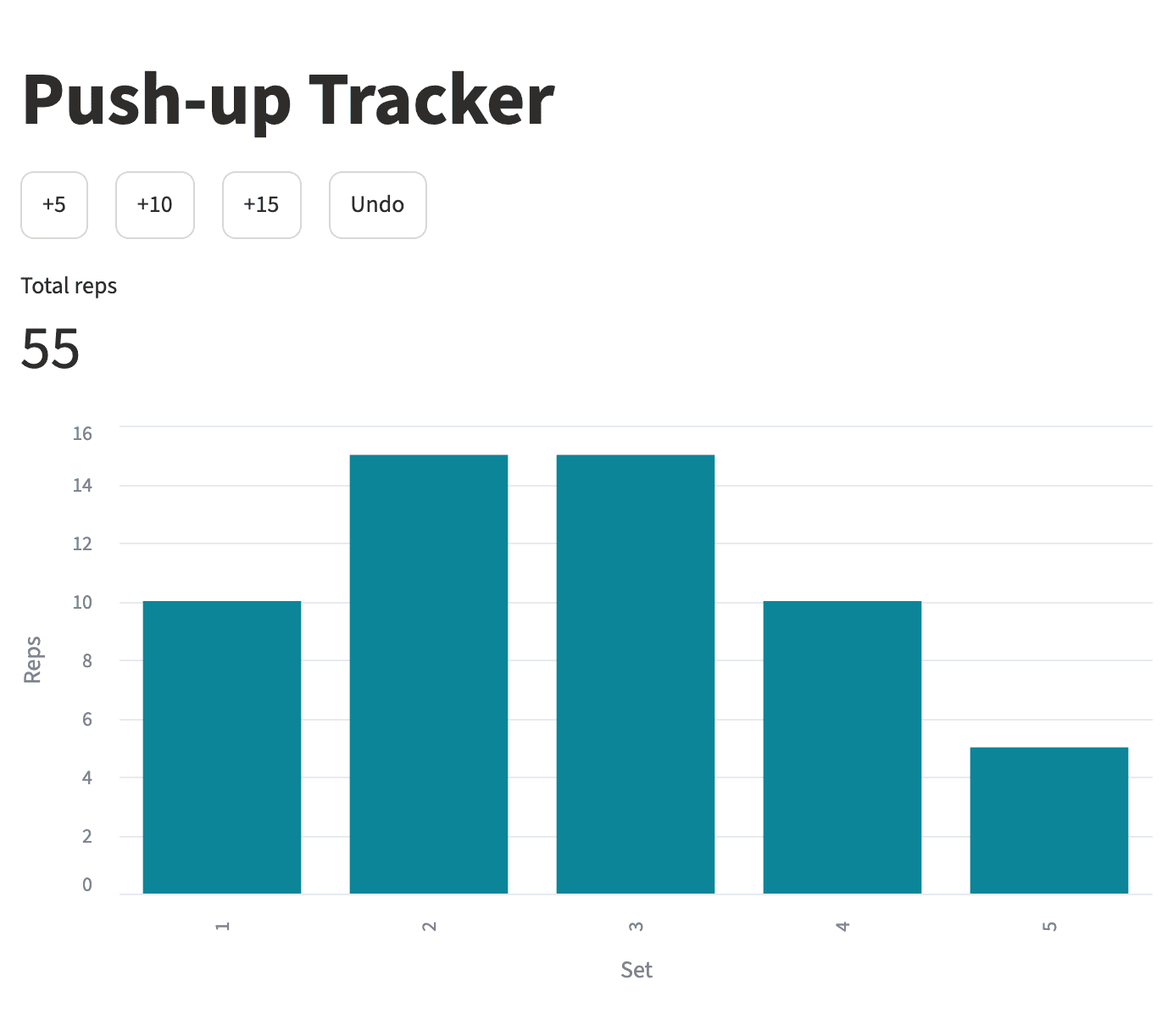
After tapping +10, +15, +15, +10, and +5, the app shows 55 total reps across five sets. Without session state, the list would be empty again after every click.
Why Do My Variables Reset in Streamlit?
This counter never gets past 1:
import streamlit as st

count = 0
if st.button("Add one (broken)"):
    count += 1
st.write("Count:", count)
Each click reruns the script, which sets count back to 0 before adding 1. The fix is to create the value only if it doesn't exist yet:
if "count" not in st.session_state:
    st.session_state.count = 0

if st.button("Add one"):
    st.session_state.count += 1
st.write("Count:", st.session_state.count)
st.session_state.count and st.session_state["count"] are the same thing. Use the bracket form for keys with spaces or names built at runtime. Reading a key that was never set raises an error, which is why the if ... not in check comes first.
When Should You Use a Callback?
A callback is a function passed to on_click or on_change. It runs before the script reruns, so everything on the page sees the new value.
Compare that with the if st.button(...) pattern. The code inside the if runs partway down the script, so anything drawn above it still shows the old value:
if "likes" not in st.session_state:
    st.session_state.likes = 0

st.write("Likes:", st.session_state.likes)  # one click behind
if st.button("Like"):
    st.session_state.likes += 1
Move the update into a callback and the number is current:
def like() -> None:
    st.session_state.likes += 1

st.write("Likes so far:", st.session_state.likes)
st.button("Like it", on_click=like)
Use args= and kwargs= to pass values, as the push-up buttons do. Write on_click=like, not on_click=like(), which calls the function while the page is being drawn.
Link a Widget to Session State With key
Give a widget a key and its value is available as st.session_state[key]. That lets a callback read it or change it:
if "celsius" not in st.session_state:
    st.session_state.celsius = 20.0
    st.session_state.fahrenheit = 68.0

def to_fahrenheit() -> None:
    st.session_state.fahrenheit = st.session_state.celsius * 9 / 5 + 32

def to_celsius() -> None:
    st.session_state.celsius = (st.session_state.fahrenheit - 32) * 5 / 9

st.number_input("Celsius", key="celsius", on_change=to_fahrenheit)
st.number_input("Fahrenheit", key="fahrenheit", on_change=to_celsius)
Set the starting value in session state or with the widget's value= argument, not both. If you do both, session state wins and Streamlit shows a warning.
Fix "st.session_state Cannot Be Modified After the Widget Is Instantiated"
Streamlit raises StreamlitWidgetAlreadyInstantiatedError when you assign to a widget's key after that widget has been created in the same run:
st.text_input("Search", key="query")
if st.button("Clear"):
    st.session_state.query = ""  # error: the widget already exists
Do the assignment in a callback, which runs before any widget is created:
def clear_query() -> None:
    st.session_state.query = ""

st.text_input("Search", key="query")
st.button("Clear", on_click=clear_query)
Buttons and file uploaders are stricter: you can't set their state at all.
Why Does a Widget Lose Its Value When Hidden?
Streamlit deletes a widget's state on any run where the widget isn't drawn. Uncheck the box below and check it again, and the nickname comes back empty by default. Adding persist_state="session" (it needs a key) keeps it:
if st.checkbox("Show profile fields", value=True):
    st.text_input("Nickname", key="nickname", persist_state="session")
The same cleanup happens when you switch pages in a multipage app. Use persist_state="page" to keep a value only while the user stays on that page. Values you assign yourself, like st.session_state.sets, aren't tied to a widget and are never cleaned up this way.
Share State Across Pages
All pages in an app share one st.session_state. Initialize shared values in the entry script, before calling navigation.run():
if "cart" not in st.session_state:
    st.session_state.cart = []

def shop() -> None:
    st.button("Add coffee", on_click=st.session_state.cart.append, args=("coffee",))

def checkout() -> None:
    st.write("In your cart:", len(st.session_state.cart))

navigation = st.navigation([st.Page(shop, title="Shop"),
                            st.Page(checkout, title="Checkout")])
navigation.run()
Session State vs Caching vs Query Parameters
| Tool | Scope | Survives a page refresh | Use it for |
|---|---|---|---|
st.session_state |
One browser tab's session | No | User choices, counters, multi-step forms |
st.cache_data / st.cache_resource |
All users, by default | Yes, while the server runs | Loaded data, connections, models |
st.query_params |
Whoever has the URL | Yes | Shareable filters and views |
Refreshing the page or opening a second tab starts a new session with empty state. If a value has to last longer, write it to a file or database. For speeding up reruns, see Streamlit caching.
Practical Tips
- Initialize everything at the top of the script, so the rest can assume the keys exist.
- Inspect it while debugging with
st.write(st.session_state). - Reset a value with
del st.session_state["sets"]; the initialization block recreates it on the next run. - Don't copy large DataFrames into session state for every user. Cache them once and store only the user's selections.