
The quickest free way to deploy a Streamlit app is Streamlit Community Cloud: push app.py and requirements.txt to a GitHub repository, then create the app at share.streamlit.io. If you need a different host, any service that can run streamlit run app.py on an open port will work. This post covers Community Cloud, Render, and Docker, with the platform details as documented in November 2026.
Quick Example
A deployable repository needs two files. First, app.py, here a small savings calculator:
import numpy as np
import pandas as pd
import streamlit as st

st.title("Savings Growth")

monthly = st.slider("Monthly deposit ($)", 50, 1000, 300, step=50)
rate = st.slider("Annual return (%)", 0.0, 10.0, 5.0, step=0.5)
years = st.slider("Years", 5, 40, 25)

months = np.arange(1, years * 12 + 1)
r = rate / 100 / 12
balance = monthly * months if r == 0 else monthly * ((1 + r) ** months - 1) / r
deposits = monthly * months

st.metric("Final balance", f"${balance[-1]:,.0f}",
          f"${balance[-1] - deposits[-1]:,.0f} from returns")
growth = pd.DataFrame({"year": months / 12,
                       "Deposits": deposits, "Returns": balance - deposits})
st.area_chart(growth, x="year", y=["Deposits", "Returns"], stack=True,
              color=["#495057", "#94d82d"], x_label="Years", y_label="Balance ($)")
Second, requirements.txt next to it, listing what the app imports:
streamlit==1.67.0
pandas==3.0.5
numpy==2.5.1
Check it runs from a clean environment before deploying:
python -m venv .venv
source .venv/bin/activate
pip install -r requirements.txt
streamlit run app.py
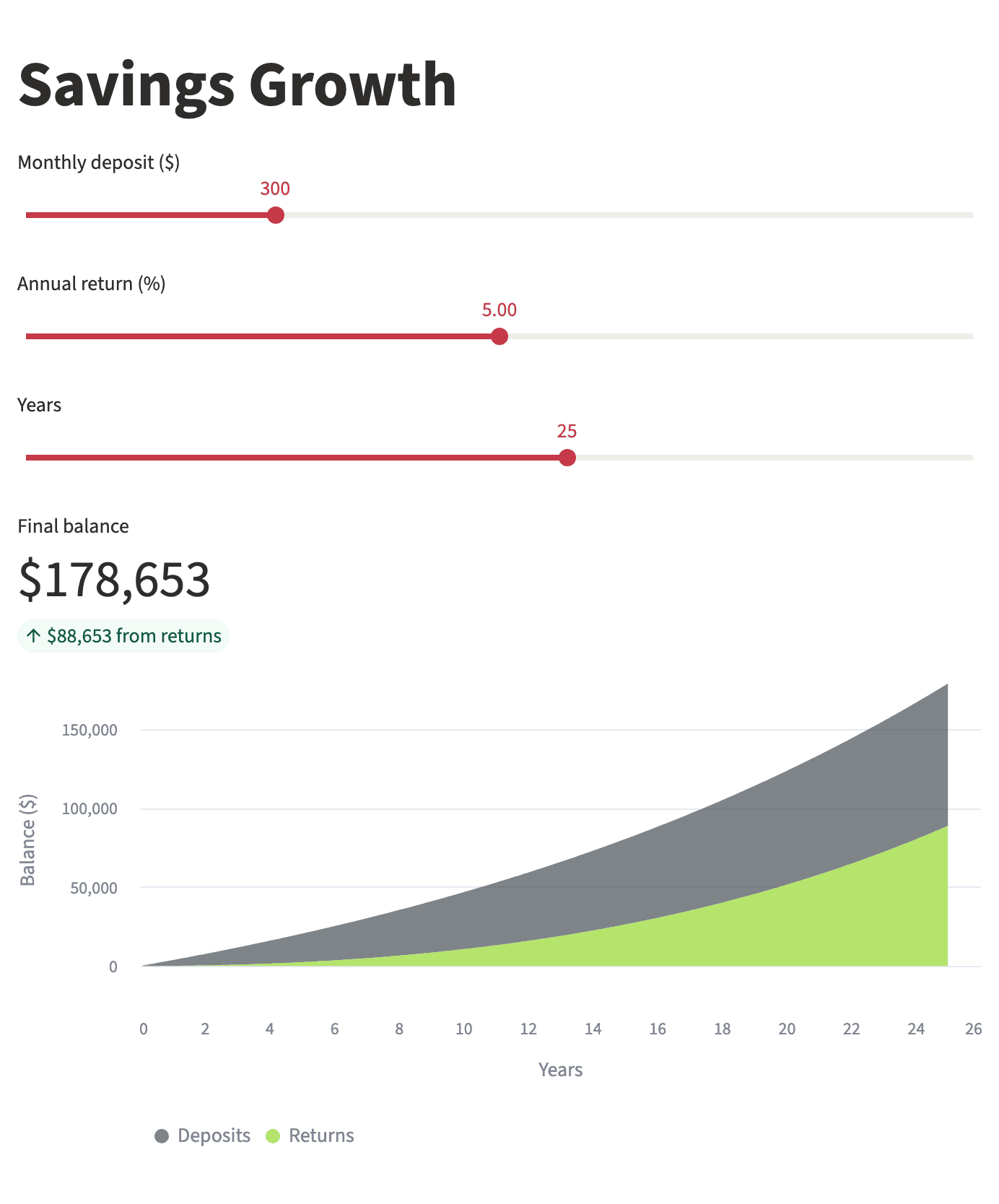
With the default sliders ($300 a month at 5% for 25 years), the app shows a final balance of $178,653, of which $88,653 is returns.
Deploy to Streamlit Community Cloud
Community Cloud is Streamlit's own free hosting, and it builds straight from GitHub.
- Commit
app.pyandrequirements.txtand push them to a GitHub repository. - Sign in at share.streamlit.io and connect your GitHub account.
- Click Create app, then Yup, I have an app.
- Fill in Repository, Branch, and File path (for example
app.py). Optionally pick a subdomain under App URL. - Open Advanced settings to choose the Python version and add secrets. The default is Python 3.12, so choose the version you developed with.
- Click Deploy. Build logs appear beside the app.
The app gets a streamlit.app address, and pushing to the branch updates it.
Limits to plan around, from Streamlit's documentation:
- An app with no traffic for 12 hours goes to sleep. A visitor can wake it with one click.
- Memory is limited to roughly 2.7 GB at most, and the guaranteed amount is much lower. These figures are subject to change.
- You can have one private app at a time. Apps from public repositories are public by default.
Which Dependency File Does It Use?
Community Cloud uses the first dependency file it finds, looking next to your entrypoint file and then in the repository root. If a directory has several, the order is uv.lock, Pipfile, environment.yml, requirements.txt, then pyproject.toml. Keep only one, so a leftover file doesn't decide your versions. Linux packages installed with apt-get go in a packages.txt file in the root.
Keep API Keys Out of the Repository
Put secrets in .streamlit/secrets.toml on your machine and add that file to .gitignore:
api_key = "replace-me"

[database]
user = "readonly"
password = "replace-me"
Read them with st.secrets:
api_key = st.secrets["api_key"]
db_user = st.secrets["database"]["user"]
On Community Cloud, paste the same TOML into the Secrets field. On other hosts, you can use environment variables and read them with os.environ, or mount a secrets.toml file.
Deploy a Streamlit App on Render
Render runs the app as a web service. The two settings that matter are binding to 0.0.0.0 and using the port Render passes in $PORT. Add this render.yaml to the repository root and create a Blueprint from it in the Render dashboard:
services:
  - type: web
    name: savings-growth
    runtime: python
    plan: free
    buildCommand: pip install -r requirements.txt
    startCommand: streamlit run app.py --server.port $PORT --server.address 0.0.0.0 --server.headless true
    healthCheckPath: /_stcore/health
    envVars:
      - key: PYTHON_VERSION
        value: 3.13.5
PYTHON_VERSION needs the full three-part version. A free service spins down after 15 minutes without traffic and takes about a minute to wake. It has 512 MB of memory, and files written to disk are lost on restart.
Run a Streamlit App in Docker
A container works on Cloud Run, ECS, Fly.io, a VPS, and anywhere else that runs images:
FROM python:3.13-slim
WORKDIR /app

COPY requirements.txt .
RUN pip install --no-cache-dir -r requirements.txt
COPY . .

EXPOSE 8501
HEALTHCHECK CMD python -c "import urllib.request; urllib.request.urlopen('http://localhost:8501/_stcore/health')"
CMD ["streamlit", "run", "app.py", "--server.port=8501", "--server.address=0.0.0.0"]
docker build -t savings-growth .
docker run -p 8501:8501 savings-growth
Open http://localhost:8501. Add a .dockerignore with .venv and .streamlit/secrets.toml so neither is copied into the image. If you put a reverse proxy in front, it has to forward WebSocket connections, or the page loads and then hangs.
Which Streamlit Hosting Option Should You Choose?
| Option | Good for | Watch out for |
|---|---|---|
| Streamlit Community Cloud | Demos, portfolios, public data apps | Sleeps when idle, limited resources, one private app |
| Render | Small production apps with a custom setup | Free instances spin down; paid instances stay up |
| Docker on your own cloud | Company infrastructure, private networks | You handle HTTPS, authentication, and updates |
Troubleshooting a Failed Deploy
ModuleNotFoundError: the package is installed on your machine but missing from the dependency file. Use the install name (scikit-learn, notsklearn).- Works locally, file not found online: paths are case-sensitive on Linux. Build paths from the script's folder with
Path(__file__).parent / "data.csv". - Health check fails or the port isn't detected: the app is listening on
localhostor on the wrong port. Set--server.addressand--server.port. - The app runs out of memory: load data inside
@st.cache_dataor@st.cache_resourceso each visitor doesn't get a separate copy of a large object.